
How a caravan workshop quotes a rooftop A/C replacement in minutes
A 2018 Jayco Journey comes in with a rooftop air-conditioner that isn't cooling, a leaking bedroom window, and its 10,000 km / 12 month service due. Three jobs, one quote — parts, labour and sundries — and a customer who wants a price before any work starts.
This walkthrough follows the whole thing on screen: how Caravan Worx turns those jobs into quote Q-1042 in minutes with RV Auto Mate's Smart Quoting — a reusable item library, real parts with real costs, a clear view of the margin before anything is sent, and a customer who accepts online. Every screenshot is from the app itself, using the fictional Caravan Worx demo workshop — no real customer data.
Switch it on once, set your rates
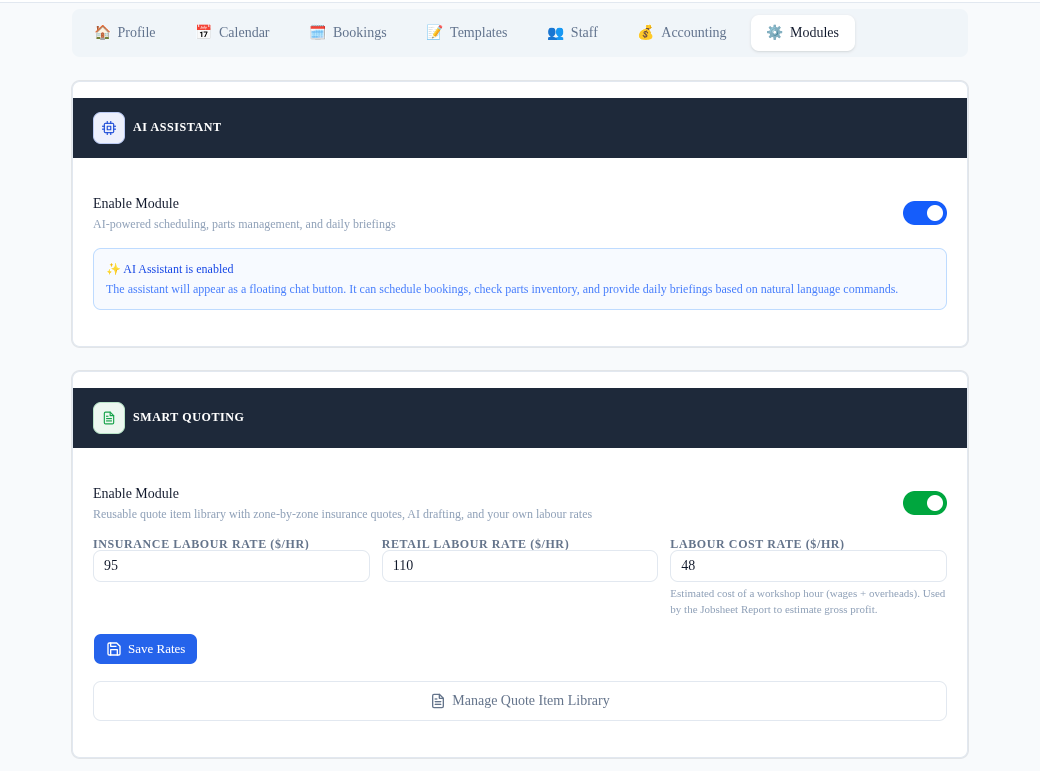
Smart Quoting lives in Settings. Turn the module on once and set your three numbers — the Insurance rate ($95/hr), the retail rate ($110/hr), and your labour cost rate ($48/hr — wages + overheads, used only for your internal profit view). The ready-made caravan and mechanical item libraries load automatically. That's the only setup there is.
Your item library: one source of truth
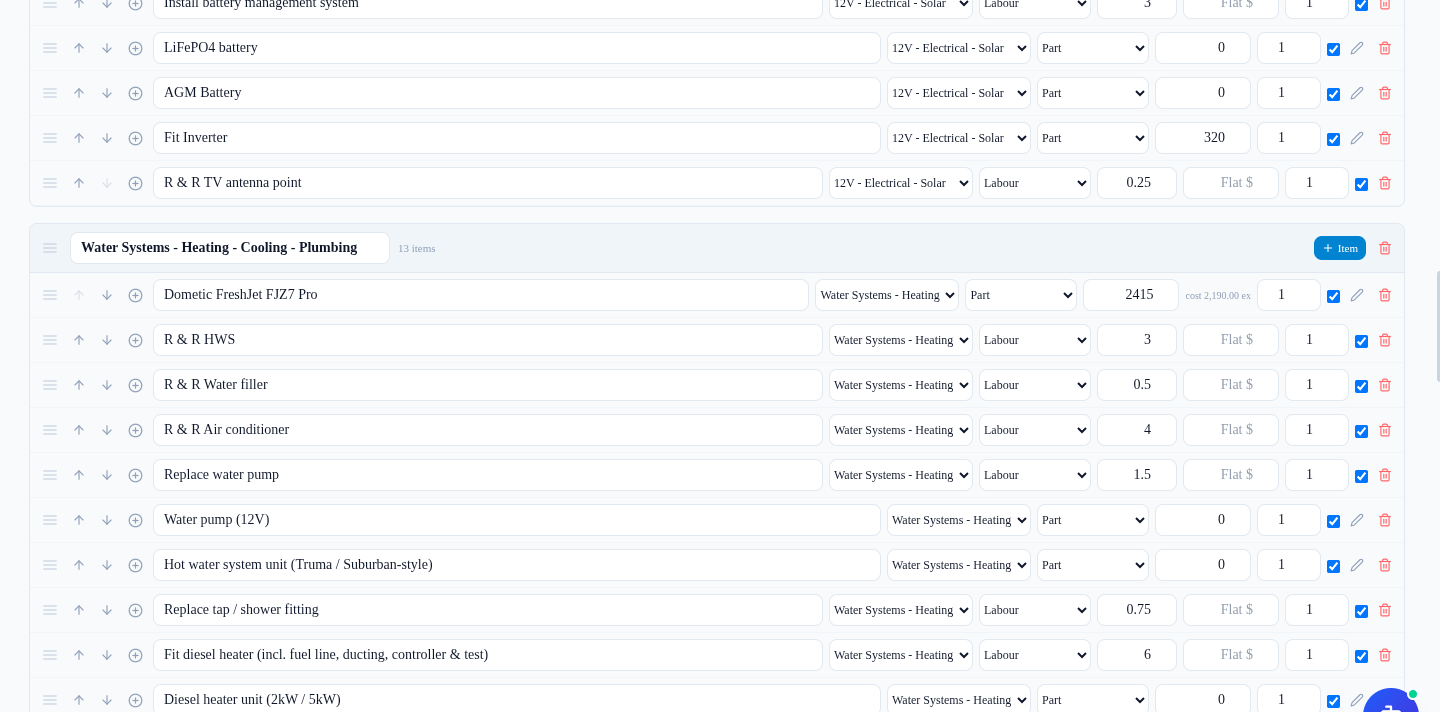
Every line you'll ever quote again lives in the item library — labour jobs with their hours and price, and real parts with their supplier. Caravan Worx keeps a Caravan catalogue and a Mechanical catalogue, so nothing from one job type leaks into another. Price things once, reuse them forever.
Parts are real products, not just prices. The Dometic FreshJet FJZ7 Pro in the Water Systems group already shows its sell price ($2,415) and, underneath, the cost RV Auto Mate remembered for it ($2,190 ex. GST) — so the true margin is visible before a single line is quoted.
Parts carry supplier, SKU and the cost you last paid
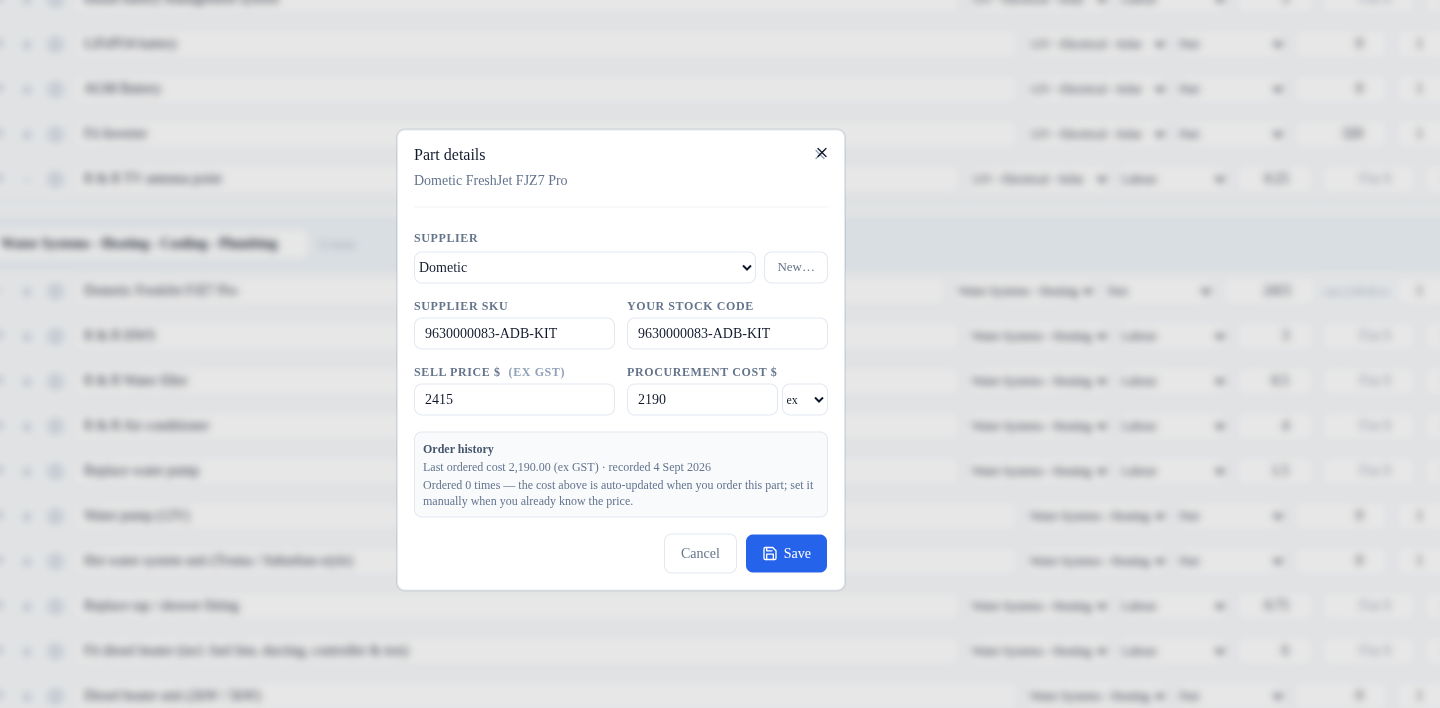
Open Part details on the FreshJet and every useful fact is in one place: the supplier (Dometic), the supplier SKU and your stock code (9630000083-ADB-KIT), the sell price, and the procurement cost. The read-only order-history line shows the last cost RV Auto Mate automatically remembered — $2,190.00 (ex. GST), recorded 4 September 2026 — and it updates itself every time you order that part.
Pre-load whole jobs as bundles
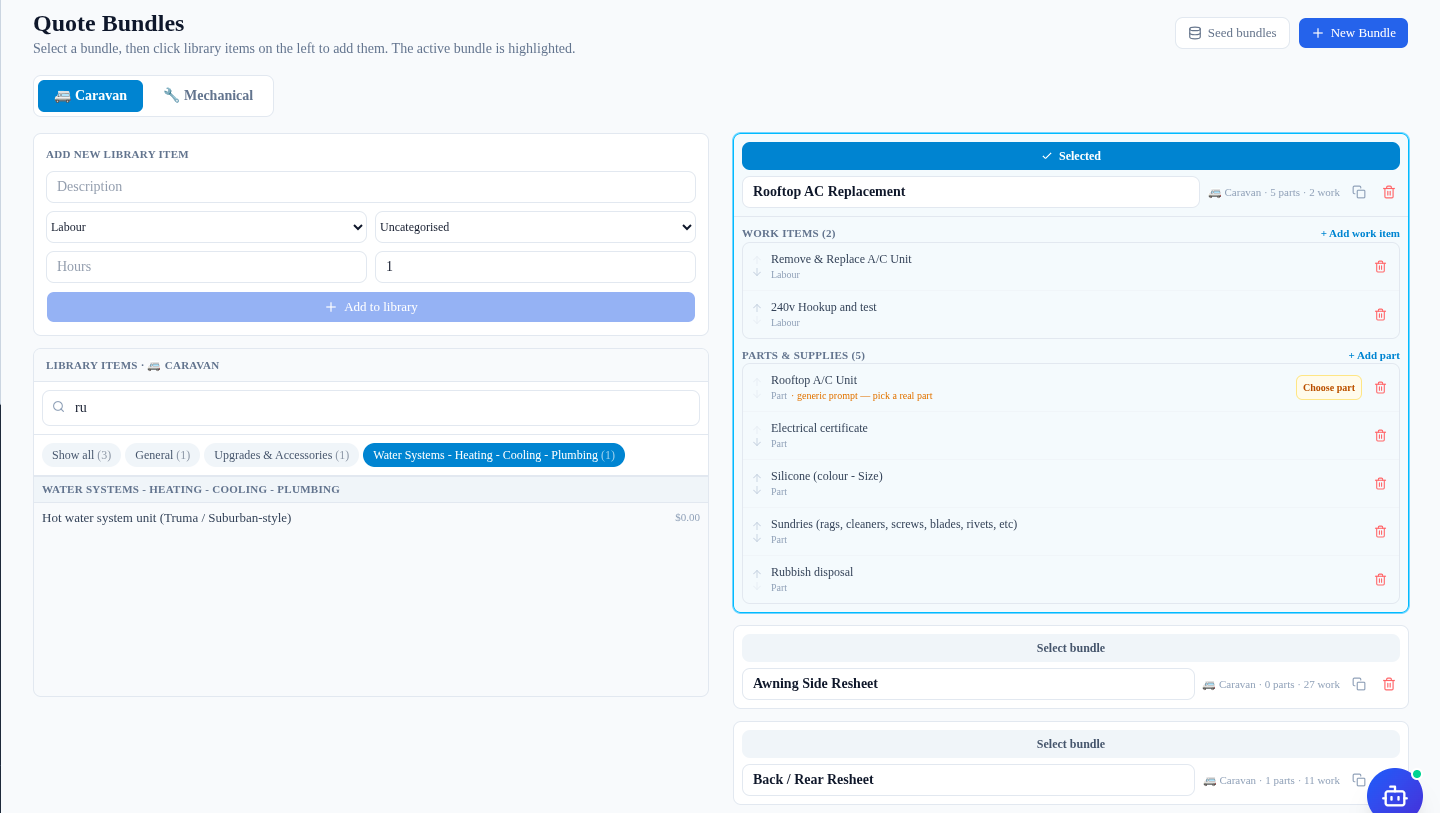
A rooftop A/C replacement is the same set of jobs every time, so Caravan Worx saves it as a bundle — a preload list. The “Rooftop AC Replacement” bundle carries two work items (Remove & Replace A/C Unit and 240V Hookup and test) plus the parts and supplies the job needs: the rooftop A/C unit itself, an electrical certificate, silicone, sundries and rubbish disposal.
Add the bundle to a quote later and every line lands at once in its own named zone — you trim it per quote in the Review wizard. Any member that's just a description, like “Rooftop A/C Unit”, stays a generic prompt until it's bound to a real part.
Resolve a generic prompt to a real part
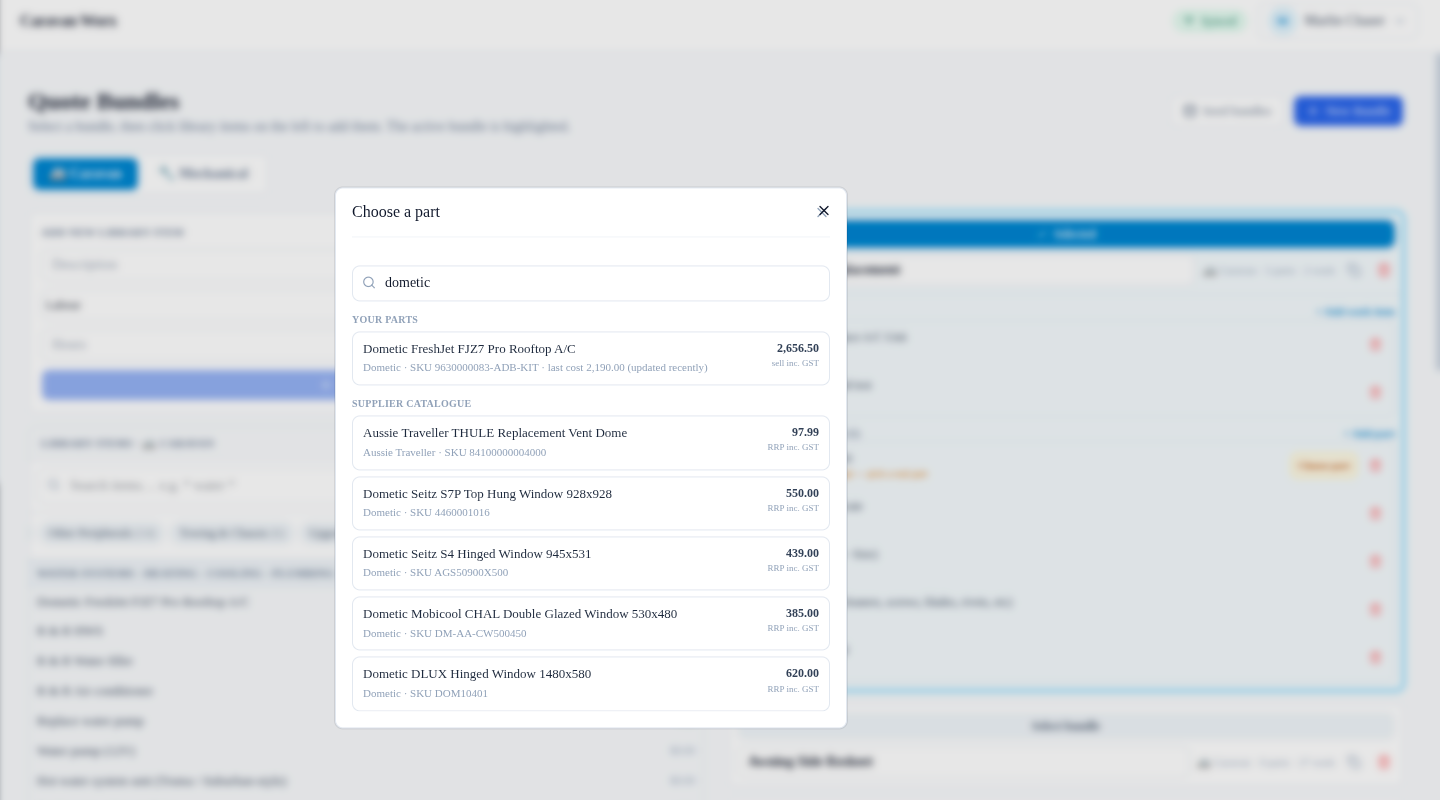
Binding the prompt is a memory-first search. Type “dometic” and the workshop's own parts come first — the FreshJet row shows its SKU, the remembered last cost ($2,190.00) and the retail price (sell inc. GST $2,656.50) — with the supplier catalogue's RRPs below it. One click and the bundle's generic line becomes the real, costed part.
Start a quote: pick the van, pick the work
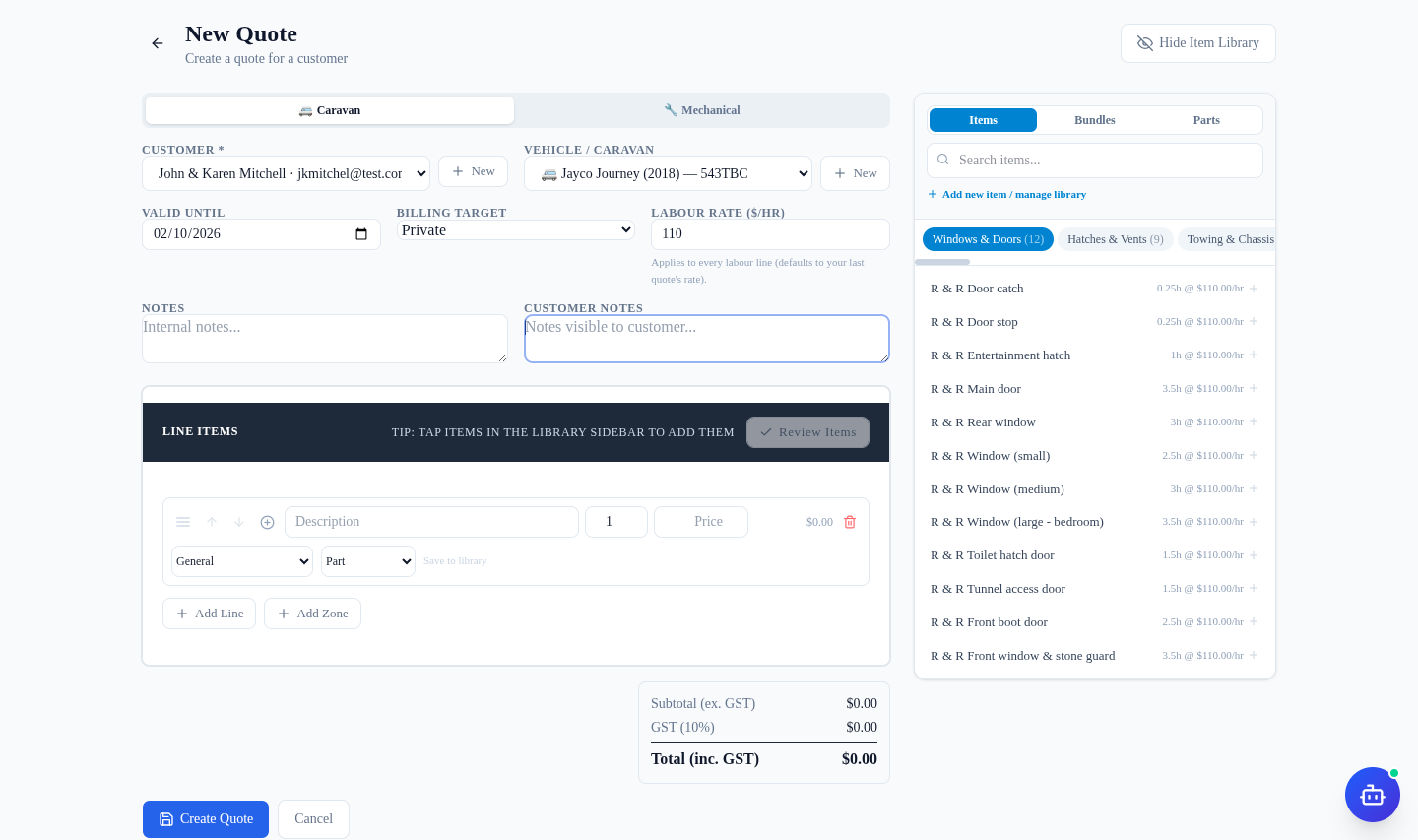
Starting the quote is pick-the-customer, pick-the-van. Caravan Worx selects John & Karen Mitchell and their 2018 Jayco Journey (rego 543TBC), chooses the type (Caravan), the billing target (Private) — and the labour rate fills itself in at $110/hr from the saved retail rate. The library sidebar on the right is already organised by category, ready to tap items onto the quote.
Add the window job, drop in the service bundle
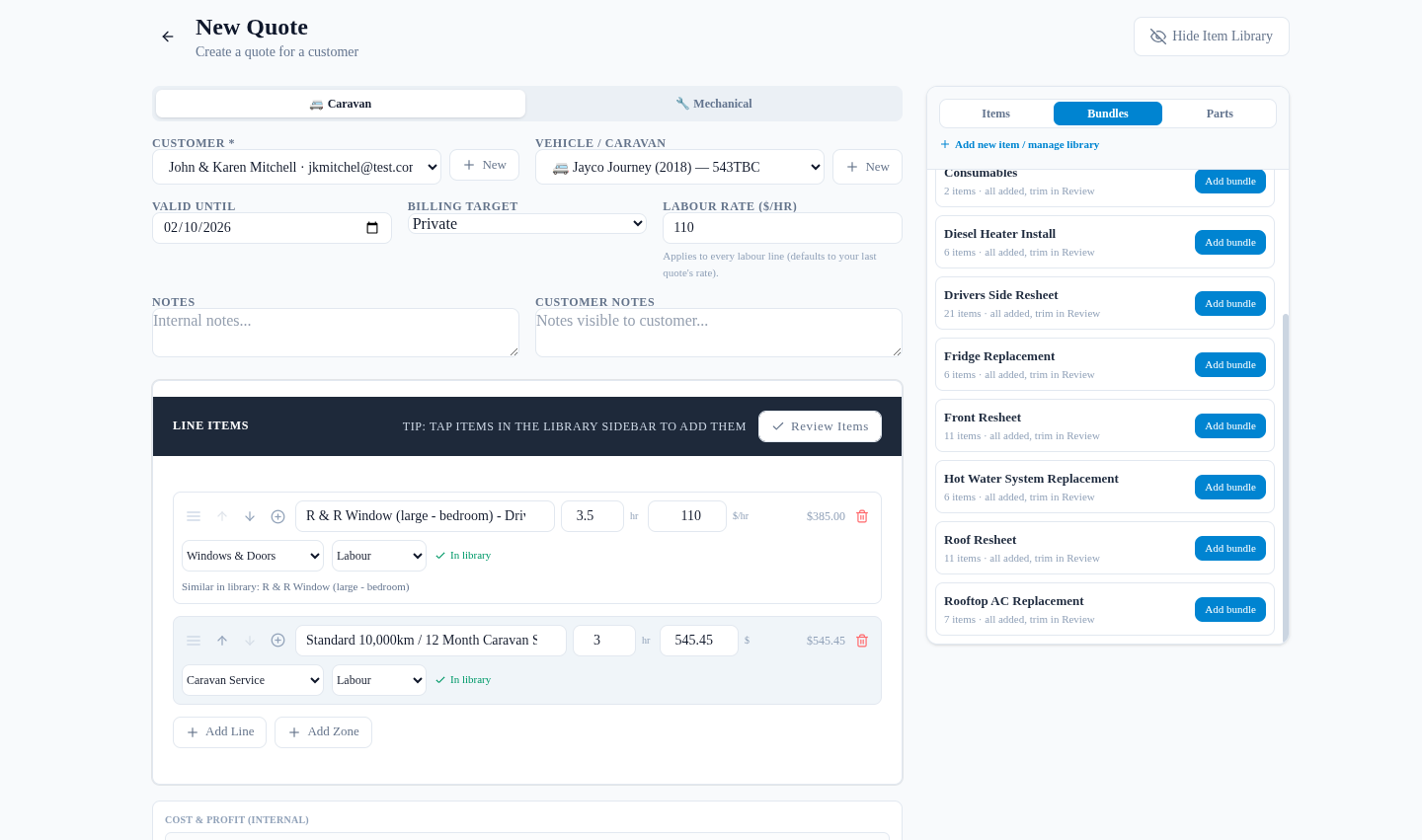
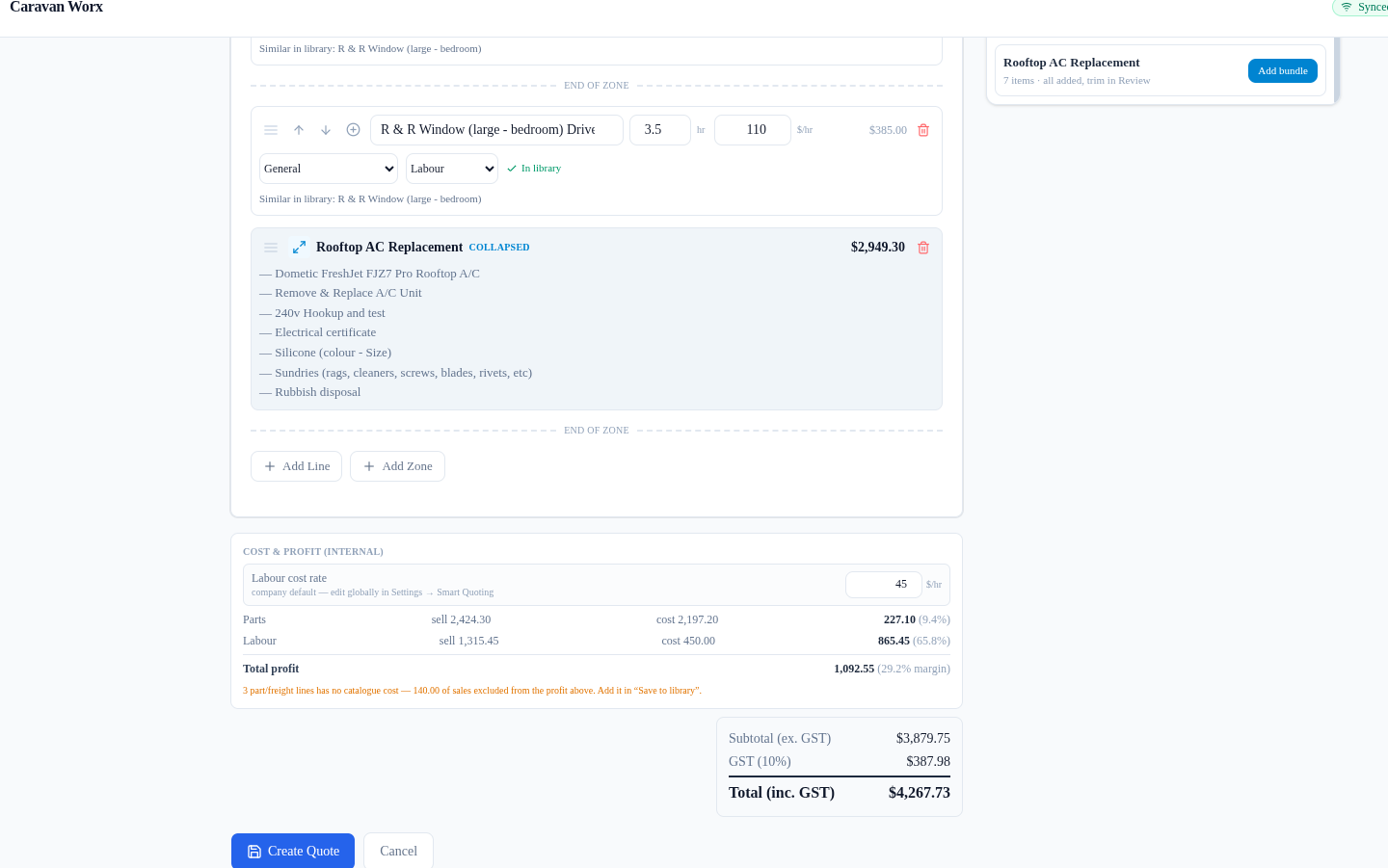
The leaking bedroom window is an hourly library job: “R & R Window (large - bedroom) Drivers Side” at 3.5 hours × $110/hr = $385.00. The 10,000 km service is a fixed-price line — “Standard 10,000km / 12 Month Caravan Service - Tandem Axle” at a flat $545.45 — where the hours are kept as scheduling metadata, so editing them never changes the agreed price.
The sidebar's Bundles tab shows every saved bundle with its item count and “trim in Review” — one click adds a whole preload list as a zone.
Add the A/C job as a zone — then collapse it for the customer
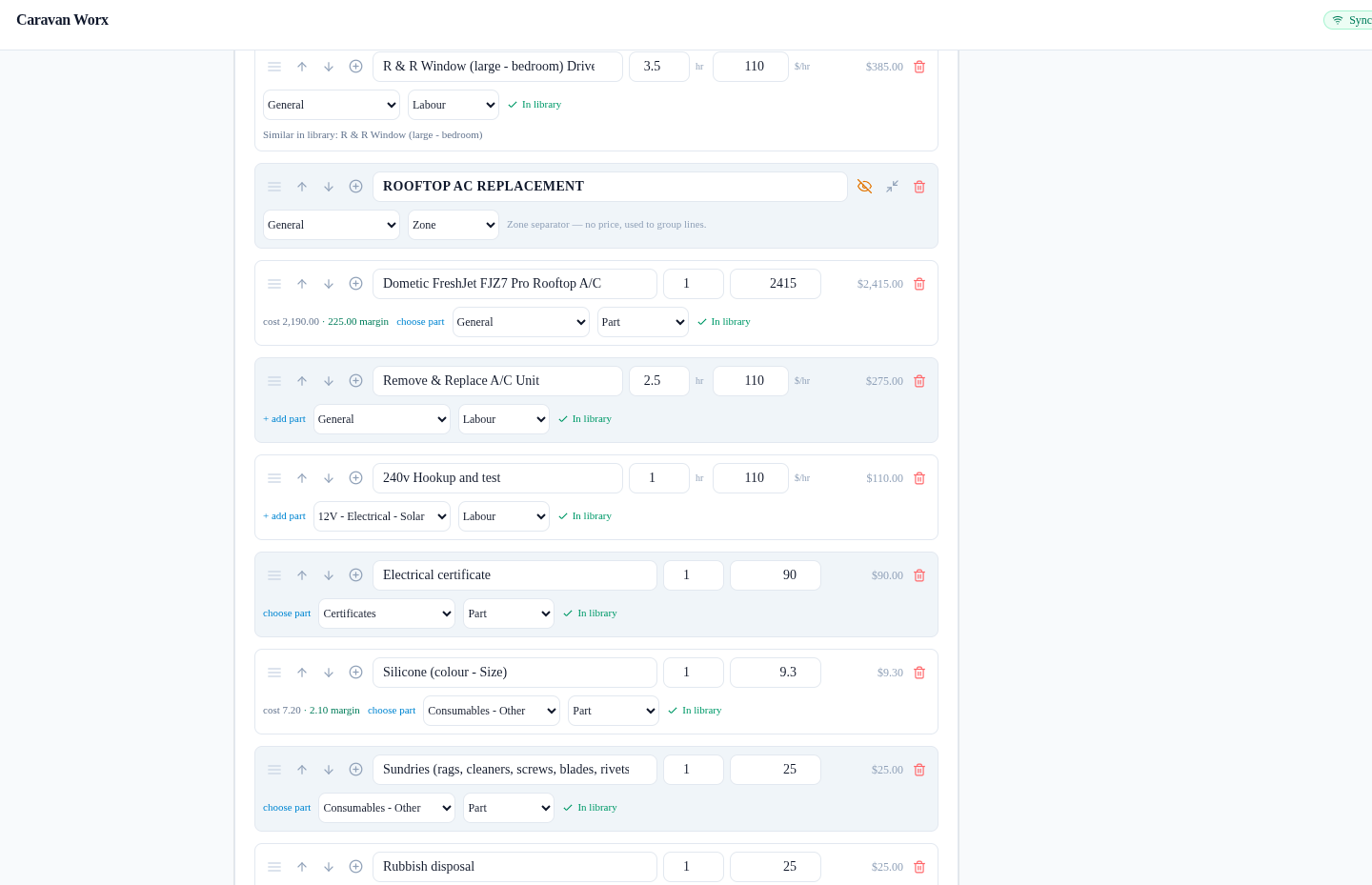
One click adds the “Rooftop AC Replacement” bundle and the whole job lands as a named zone: the Dometic FreshJet FJZ7 Pro part ($2,415.00), Remove & Replace A/C Unit at 2.5h ($275.00), 240V Hookup and test at 1h ($110.00), an electrical certificate ($90.00), silicone ($9.30), sundries ($25.00) and rubbish disposal ($25.00) — a $2,949.30 zone.
Because this is a private quote, the whole zone can be collapsed to that single $2,949.30 lump-sum line. The customer sees one clean price for the whole job, you still see every member underneath with a click — and expanded or collapsed, the numbers never change. The Cost & Profit panel below keeps running while you work.
This is where collapsed zones pay off. Need a staff-only amount inside the job — a parts markup, a hidden labour component, or a discount? Add a hidden zone adjustment and the amount folds into the zone's lump-sum total without ever being itemised on the customer's PDF, quote link or invoice. It still counts in your internal Cost & Profit panel, so the margin you approve is the margin you actually get.
Review every line before you send
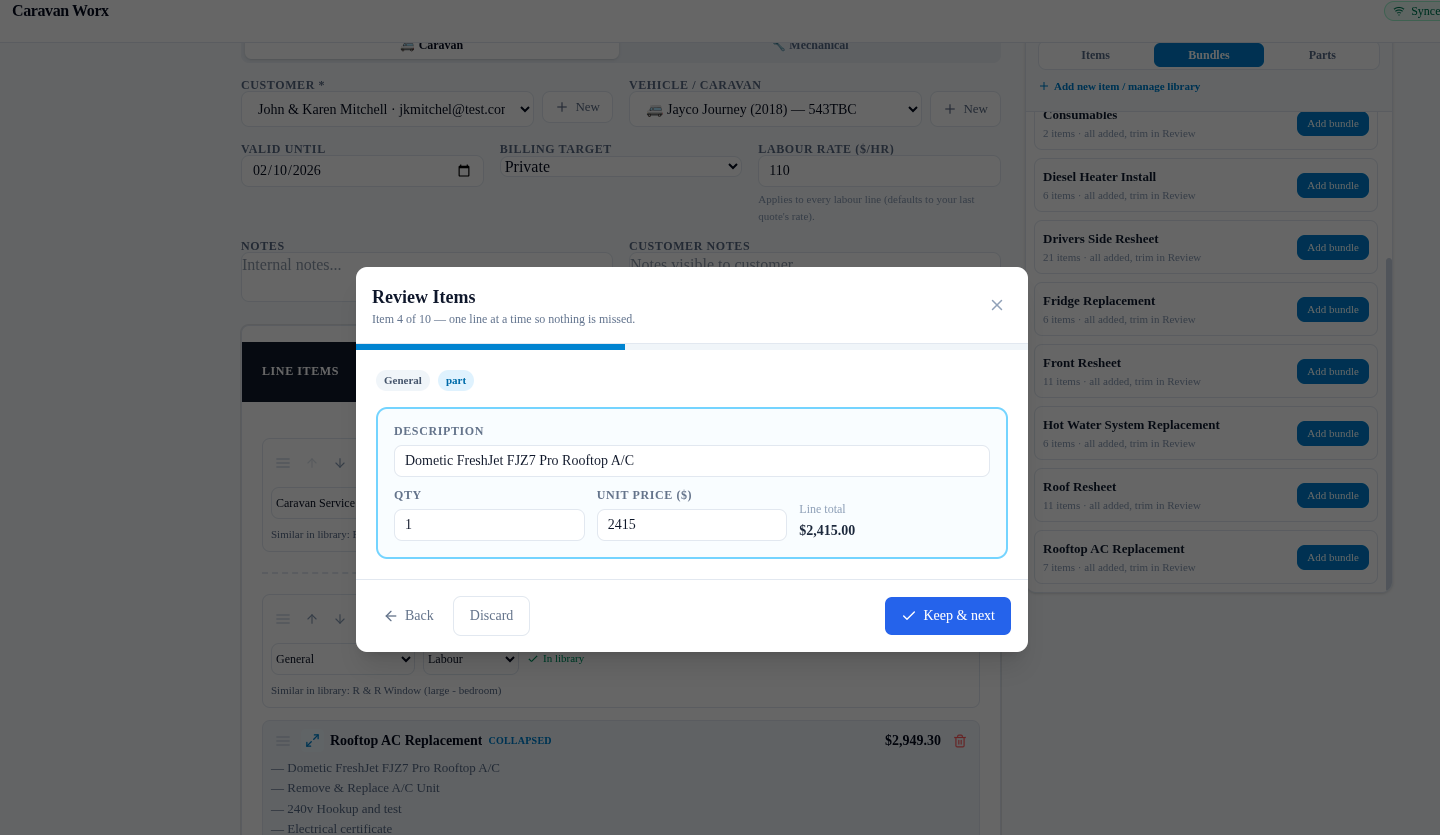
Before anything is saved, the Review wizard walks the quote one line at a time so nothing is missed — here “Item 4 of 10”, the Dometic FreshJet FJZ7 Pro at $2,415.00. Each line offers Keep & next or Discard, with quantity and unit price editable on the spot. Whole bundle zones that this van didn't need get trimmed here, quickly and deliberately.
Every part shows its true margin
Under the FreshJet line, a small chip says it all: cost $2,190.00, $225.00 margin on that part alone. That's the difference between the remembered cost and the $2,415 sell price — visible while you build, so a quote is never sent blind. Cost chips are office-only: they show for owner and office roles, never mechanics, and never on the customer's PDF.

Cost & Profit — know the number before the customer does
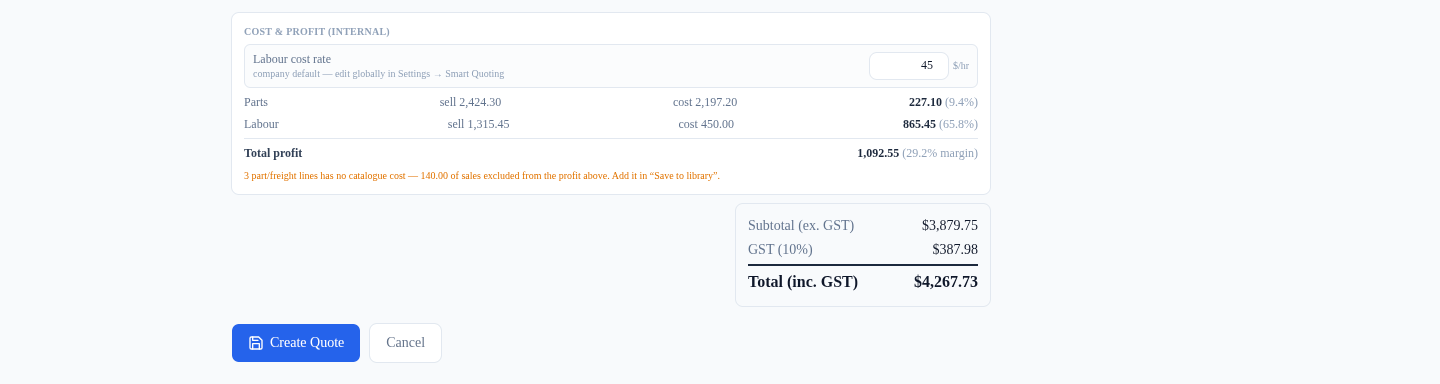
The Cost & Profit panel at the bottom of the builder splits the whole quote into sell vs cost: Parts sell $2,424.30 against $2,197.20 cost ($227.10, 9.4%), Labour sell $1,315.45 against $450.00 cost ($865.45, 65.8%), and a Total profit of $1,092.55 (29.2% margin). The labour cost rate can be overridden for this quote alone when a job's real cost differs from the company default.
Lines with no known cost are flagged rather than hidden — the amber note here shows three part/freight lines with $140.00 of sales excluded until they're saved to the library with a cost. These figures are for the office: they never appear on the customer's PDF, online link or share copy.
What the customer actually sees
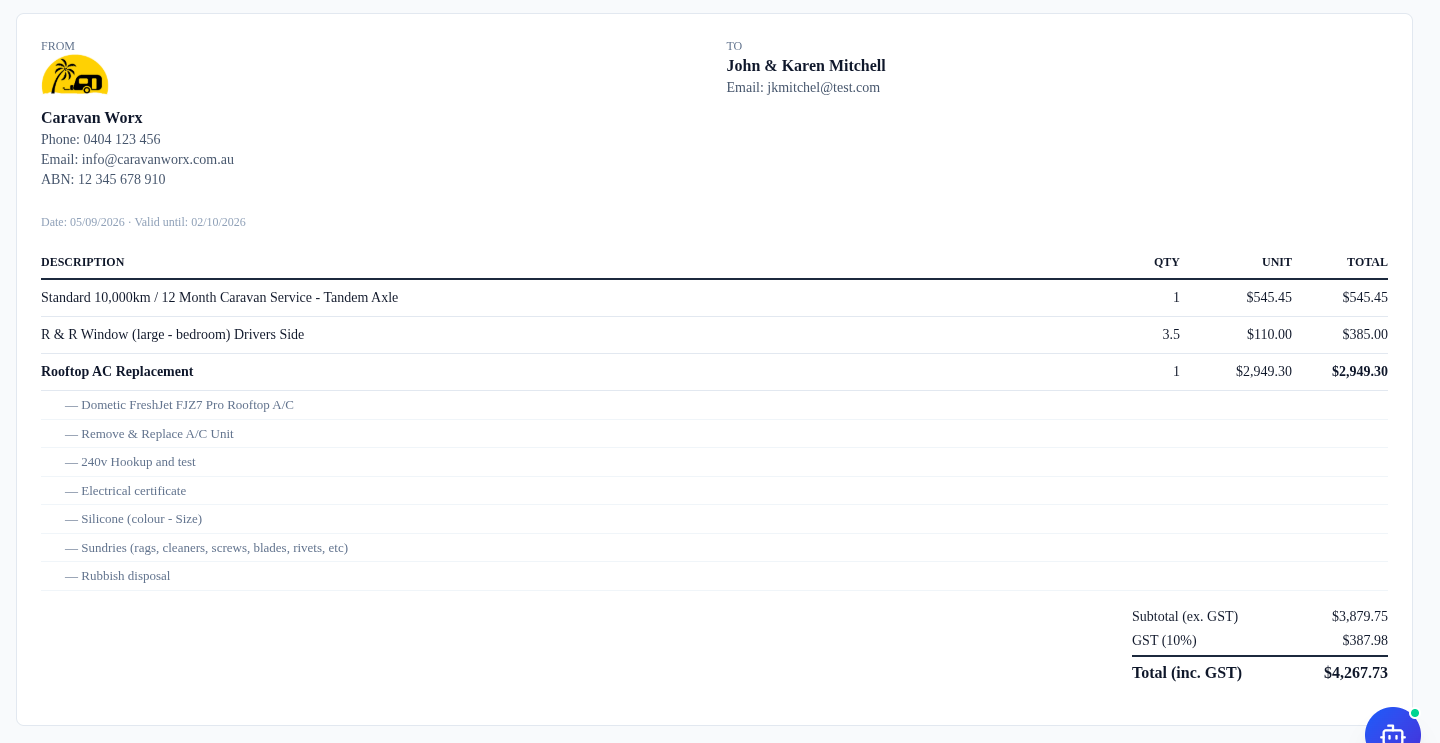
The customer sees a clean quote on Caravan Worx letterhead — no suppliers, no costs, no margin chips. The three jobs read simply: the service at $545.45, the window at 3.5 × $110.00 = $385.00, and “Rooftop AC Replacement” at $2,949.30, with the zone's member lines itemised underneath for transparency.
Totals are shown properly too: subtotal $3,879.75 (ex. GST), GST $387.98, total $4,267.73 inc. GST, valid until 2 October 2026.
Send → accepted → straight onto the workshop floor
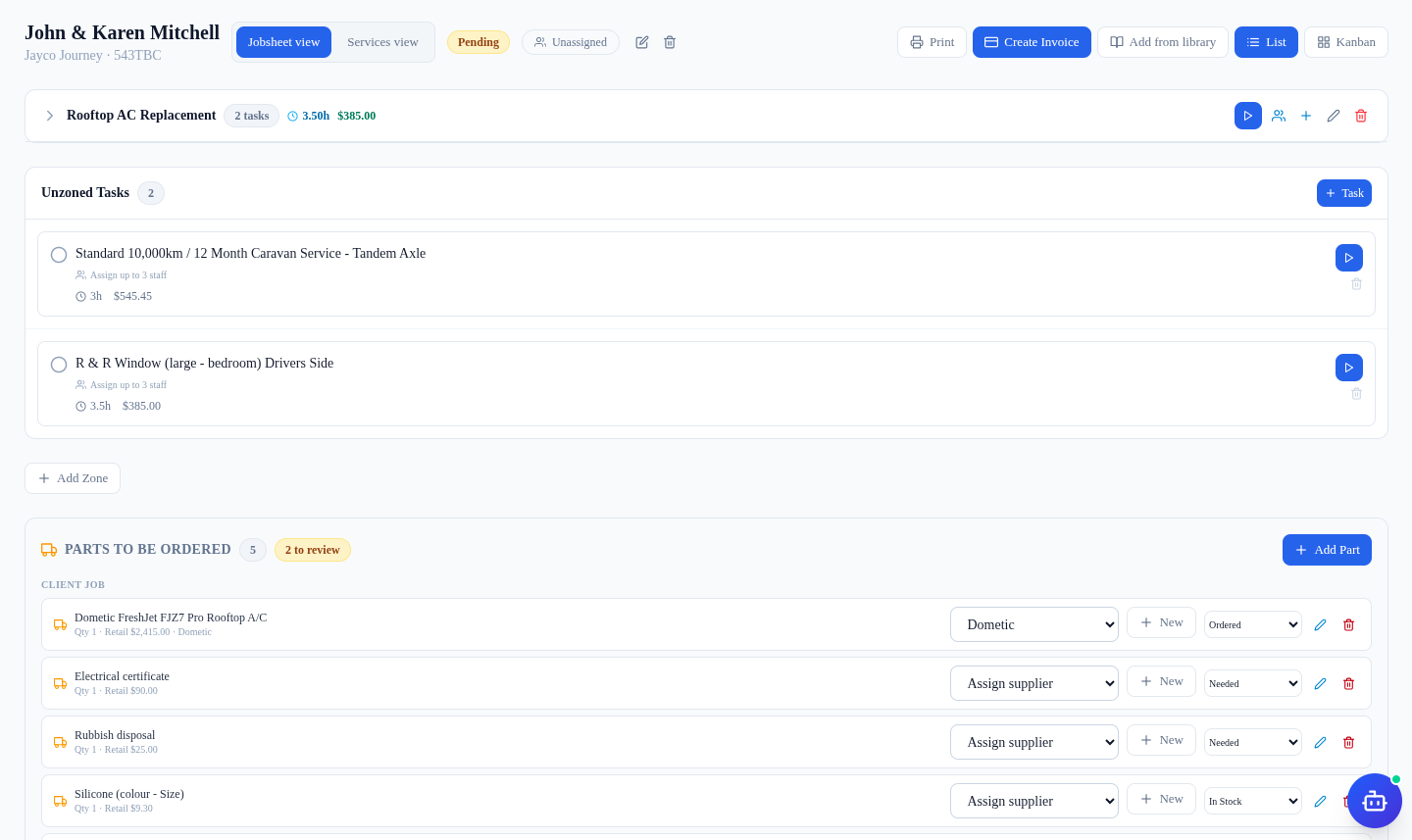
One click sends the quote as a PDF with a secure link the customer can accept online — no more “can you email me the quote?” phone tag. The status moves draft → sent → accepted, and an accepted quote converts straight into a jobsheet: the labour lines become tasks with their allocated hours, and the parts land in “Parts to be ordered”, ready for the supplier order.
Nothing is re-keyed. The same numbers that built the quote plan the job, and later, the invoice.
Key Takeaways
- Build your library and bundles once — whole jobs then land on a quote in one click.
- Real parts remember their supplier, SKU and last cost, so margins are never a guess.
- Fixed-price jobs stay fixed: hours are scheduling metadata, not a price lever.
- Cost chips and the Cost & Profit panel are office-only — customers never see them.
- Collapse a zone to a single lump-sum line for private quotes — staff-only hidden adjustments ride inside it; insurance quotes stay itemised.
- An accepted quote becomes a jobsheet with tasks and parts to order — nothing is re-keyed.
Questions, Answered
Is this a real customer or real repair?
No. The screenshots come from the fictional “Caravan Worx” demo workshop built into RV Auto Mate, with made-up customer and vehicle details (John & Karen Mitchell's 2018 Jayco Journey). It shows the real product with realistic numbers, but no real workshop data is shown.
Are the part costs and margins realistic?
They're demo values staged for the walkthrough — a Dometic FreshJet rooftop A/C selling at $2,415 with a remembered $2,190 cost, for example. The point is the behaviour: RV Auto Mate remembers what you actually paid when you order a part, and shows your true margin before you send.
Can I try this with my own parts and prices?
Yes. Start a 14-day free trial and RV Auto Mate sets up your workshop's own library from ready-made caravan and mechanical catalogues. Add your real parts and supplier prices and the same cost chips and profit panel will work with your numbers.
Try it with your own parts and prices
That's how a job that used to take an hour becomes ten minutes — and why the margin is never a surprise. RV Auto Mate also runs jobsheets, online bookings, SMS reminders and invoicing, all for $20/month for your first 6 months, then $35.